Warning: "continue" targeting switch is equivalent to "break". Did you mean to use "continue 2"? in /var/www/vhosts/help.townfish.com/wp-content/plugins/ht-knowledge-base/php/ht-knowledge-base-restrict-access.php on line 115

Warning: "continue" targeting switch is equivalent to "break". Did you mean to use "continue 2"? in /var/www/vhosts/help.townfish.com/wp-content/plugins/ht-knowledge-base/php/ht-knowledge-base-restrict-access.php on line 123
How do i add or edit my profile location? – Help | Townfish.Com
  1. Home
  2. Personal Profile Page
  3. How do i add or edit my profile location?

How do i add or edit my profile location?

To change your profile location:

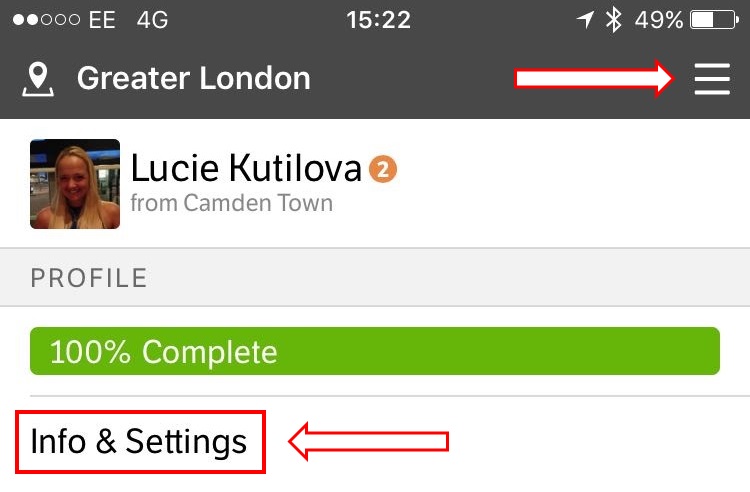
  1. Click on the profile menu icon and click Info & Settings                                           
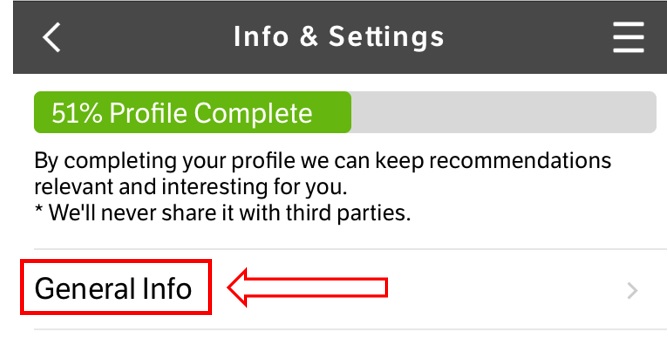
  2. Click on General Info                                                                                             
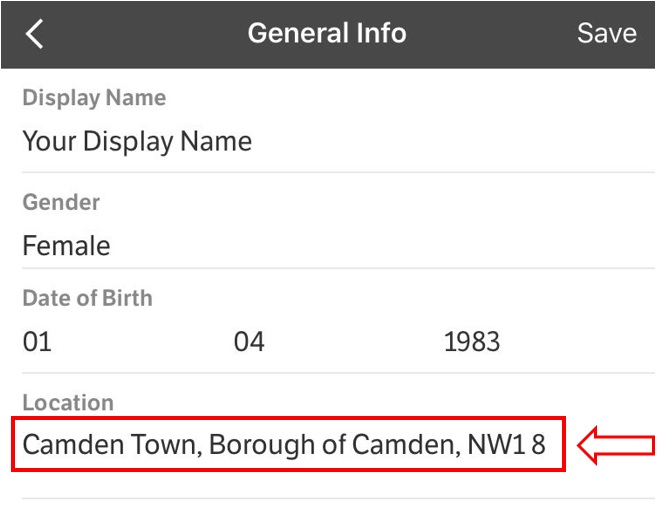
  3. Add or Edit your profile location                                                                         
  4. Click SAVE
Updated on May 25, 2017

Was this article helpful?

Related Articles